
An Email From My Bank Triggered an Alert, Am I Being Trained to Ignore Phishing Emails?
I received an email from my bank that triggered an alert in my email client. The alert read: "⚠️ Sender could not be verified". If I was not expecting the email I would have instinctively delete the email or I may have missed it because it would have been in my spam folder.

I received an email from my bank that triggered an alert in my email client. The alert read: "⚠️ Sender could not be verified".
If I was not expecting the email I would have instinctively delete the email or I may have missed it because it would have been in my spam folder.

Have you ever received a legitimate email that triggered similar alerts or was it also sent to your spam folder?
I was first introduced to email deliverability by John Possidente, one of the best in the business, and I learned a lot from him, so I was able to see and understand how serious this problem was. Many would have just clicked the "Trust this sender" button, I knew better.
Remembering that I saw this happening few times in the past for other legitimate emails, I decided to do a quick test to see how many organizations or businesses have this problem.
I checked the readily available information on the DMARC, or Domain-based Message Authentication, Reporting & Conformance status for 100 institutions and businesses across the US, Panama, and Jamaica.
Here is what I found:
- 30.7% are completely exposed to spoofing (no protection against spoofing)
- 13.9% have DMARC without enforcing it (only monitoring)
- 10.9% have DMARC enforcing quarantine (suspicious emails would be quarantined)
- Only 58.4% have DMARC and reject spoofed emails (full protection)
Interestingly I saw a clear regional difference:
🇺🇸 US: 91.1% protected (highest implementation)
🇵🇦 Panama: 40.0% protected (60% exposed to spoofing)
🇯🇲 Jamaica: 45.0% protected (55% exposed to spoofing)
The DMARC without enforcement Trap and Why the 13.9% Have False Security
Here's an important thing to note, only having the DMARC record added doesn't mean you're protected. So the 13.9% who implemented DMARC in monitor only mode are not benefiting at all. It is as good as not having it implemented. Phishing emails are seen but nothing is done to filter them from your inbox.
It's like having website application firewall app that logs malicious traffic but never triggers the rules to block those types of traffic.
Before I go any further, let me clarify that DMARC was developed to address the authentication/reporting aspect of email security, so while it does not intercept other types of phishing/spam emails, it allows us to be able to identify spoofing emails with a mechanism to stop them.
This is very important as we will find out further in my case study.
The $2.77 Billion Challenge That 30.7% of Organizations Face
Business Email Compromise cost organizations $2.77 billion in 2024 alone, according to the FBI, on page 10 in their report. Total cybercrime losses hit $16.6 billion, a 33% surge from the previous year.
With nearly one-third of organizations completely unprotected, criminals have an easy playground. They can perfectly impersonate these organizations, sending fake invoices, wire transfer requests, and phishing emails that look 100% legitimate.
But here's the real tragedy: When legitimate emails from the 30.7% trigger security warnings, customers learn to ignore them. When fake emails arrive with warnings, because customers have been taught to ignore these or approve when legitimate emails triggered the warnings, they click, which would make them vulnerable.
It's a vicious cycle. Organizations know it. They want to fix it. But there's a massive gap between wanting email authentication and safely implementing it.
DMARC is like a verified checkmark for email. It tells providers: "Yes, this really came from us." Without it, even legitimate emails look suspicious, and fake ones look real.
How DMARC Actually Works
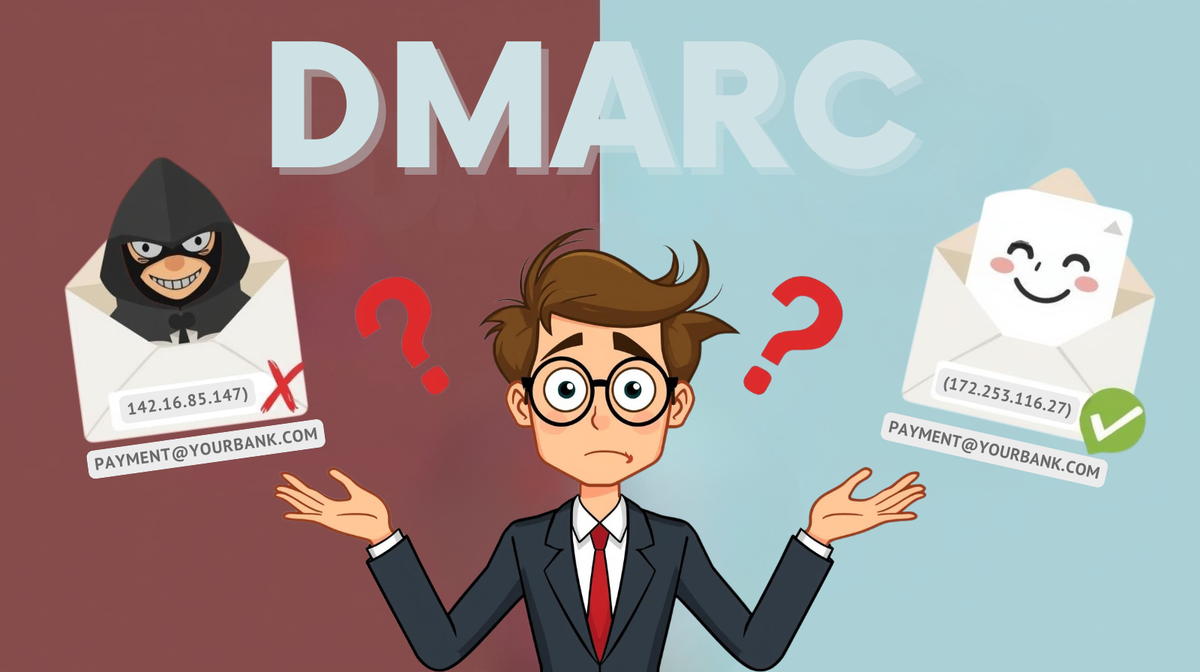
Think of DMARC like a verification phone call. When you receive an email from [email protected], your email provider acts like a security guard. It looks at the sender's domain and calls up companydomain.com asking: "Did you or an approved sender actually send this email?"
The company's domain checks its records and responds with either "Yes, that's really from us" or "No, that's fake!" The domain can also tell the security guard what to do with suspicious emails: do nothing (p=none), put them in spam (p=quarantine), or block them completely (p=reject).


When a hacker tries to impersonate companydomain.com, the security guard still makes that verification call. The real domain says "No, we didn't send that!" and the fake email gets blocked. Without DMARC, there's no one to call, the security guard just lets everything through.
Why 13.9% Have DMARC But Can't Turn It On
From my test, the 13.9% of organizations who implemented DMARC but did not enforce it, maybe have done so for a variety of reasons which is mainly from a fear of making mistakes that could result in customers not receiving emails which would affect the business and its service(s) offered.
It's important to understand that DMARC must be implemented in phases as we verify all email senders of a company's domain(s).
The Complexity Nobody Mentions
Reflecting on my own experience with DMARC, I know that organizations can have as much as 27 different email sending sources. For example, a bank could have:
- Core banking platform
- Marketing automation (3 different tools)
- Customer service ticketing
- Appointment scheduling
- Document signing services
- Survey tools
- Event management platforms
- Branch notification systems
- Mobile app notifications
- Third-party statement delivery
Most being added over years by different teams with no centralized documentation. The IT team inherits this complexity without a roadmap.
The Technical Barriers Are Real
Here's what stops DMARC implementation for organizations:
- SPF record limits: You can only have 10 DNS lookups. I've seen SPF records being over 20 DNS lookups which meant the SPF was already failing. Think of SPF as your email guest list for email providers where only the first 10 names on the list are checked. This means if you have 20 legitimate email services, the last 10 will not be seen as legitimate.
- DKIM configuration: Requires coordination with every vendor. Some vendors don't even support it properly.
- Subdomain chaos: For example, the marketing department sending from news.bank.com, operations from alerts.bank.com. Each needs a different configuration.
- Legacy systems: That critical wire transfer system from years ago does not support modern authentication.
Nobody wants to be the person who broke email for the entire company.
Common Challenges with DMARC Implementations
From experience and interactions with other IT professionals, the following are the typical scenarios that delay or prevent the implementation of DMARC:
Concern that implemented DMARC would block important emails which would have negative business consequences.
Many businesses over the years may have used different mailing platforms and systems without proper documentation so IT department is not able to correctly identify the legitimate sending sources.
Their SPF records are very long with over 10 lookups which exceeds what networks would do when verifying legitimate senders. If your organization or business SPF record exceeds 10 lookups, you can be sure some of your legitimate senders will be missed and will trigger warnings in email clients or scanners.
Beyond Compliance - The Risk to Reputation
Looking back at my test we see the US having a higher implementation of DMARC. This has largely been due to stricter regulations there than what presently exists in Jamaica and Panama and hence why the great difference in DMARC implementation and while one may say it is due to some organizations not being aware of it, implementing strict regulations would drive organizations to become aware.
The greater risk here however is the reputation of the organization or business. Not implementing DMARC could be a silent killer to an organization or business reputation creating problems that are not even on its radar. Whenever customers get use to receiving a business or organization's emails that trigger email alerts, they get used to it and ignore it and when some fall prey to phishing emails, they will lose trust in that organization or experience anxiety when doing business online whether it is ecommerce or sending contracts to an organization. Without a clear way to identify phishing emails from legitimate emails create a problem to an organization's reputation.
Can DMARC Be Fully Implemented Safely?
I've implemented DMARC safely without the negative results, thanks to John Possidente's early guidance, research and teamwork. Once it is understood correctly, implementation can be done without negative results. The following is a recommended way to safely implement DMARC in phases:
Discover what or who is sending emails using your domain(s) (p=none)
- Start with monitoring to see all the senders who use your domain or IP address. Because some sends are conditional like triggers or alerts or scheduled, it is recommended to do this between 30 and 60 days. This also helps you to get enough information to know if you are being spoofed or if there is a legitimate sender that was not documented.
- Document legitimate sending sources and update your SPF record to reflect this. This is where you may see the need to also remove domains or IPs from your SPF record that may no longer be used.
- Make sure to document everything including changes (this should be revisited in case of changes).
Gradual Enforcement
- Set your DMARC quarantine record from 10% while monitoring the results.
- Only 1 in 10 suspicious emails will go to the spam folder.
- Fix issues as they appear, for example an IP or domain missing from your SPF record
- Increase the percentage gradually as you notice no legitimate sender being quarantined. For example you could do from 10% to 25%, 50%, and then 100%.
Full Protection
- Move to p=reject only when your data proves it's safe
- Keep monitoring for new sources as there may be new legitimate sources added. It is important to communicate this with other departments especially decision makers of email sending to coordinate the changes whether to add a new legitimate sender or remove one that is no longer being used.
- Maintain documentation for future teams
Solving Common Challenges
- Third-party issues: Delegating to subdomain solves most of the problems. for example, using news.bank.com instead of bank.com
- Unknown senders: The DMARC reports will reveal unknown senders with some possibly being spoofing attacks.
- Legacy systems: Using subdomains or relay services work
- SPF too large: As a last resort, use SPF flattening which can reduce DNS lookups greater than 10. This should in most cases be dynamic to account for IP changes from the SPF included domains. An alternative could be to move some of the SPF records to that of a created subdomain's SPF record to reduce the lookups.
So Why the Difference in the Adoption?
The difference in DMARC adoption between the U.S. and countries like Panama or Jamaica isn't only about regulation. It's about awareness and the infrastructures.
In the U.S. DMARC has become necessary for organizations and businesses. Service providers like Google, Yahoo, and Microsoft have made it mandatory on their network which has forced organizations and businesses to adopt. Federal mandates and frameworks like PCI DSS and FedRAMP and others also reinforce its importance for email security. The result is a broader adoption of DMARC.
From my test result for organizations in Jamaica and Panama, we can conclude two things: DMARC adoptions are either not setup or two, they are only setup on the domains used for business emails, excluding domains that are not used for sending emails. This however leaves those domains without DMARC and vulnerable to spoofing attacks which can be leveraged to exploit customers or clients of an organization.
Awareness is also shaped by context. In Panama, for example, the acronym "DMARC" is widely known as Dirección de Métodos Alternos de Resolución de Conflictos, a government office focused on conflict resolution. While unrelated, this shows how the technical DMARC standard may not yet have the same visibility locally. Broader understanding will come as awareness grows, and regional infrastructures evolve.
Your Organization Isn't Alone
Good news first, 58.4% of organizations I analyzed have successfully implemented full DMARC email protection. Every one of them started with the same fears and challenges. They prove it's absolutely achievable.
But if you're in the 30.7% without any protection, or the 13.9% stuck in monitor mode, you're not alone either. You're part of a significant group facing the same challenges.
If your legitimate emails show security warnings, you're not negligent, you're one of many. If you have DMARC but can't enforce it, you're not incompetent, you're cautious. If the complexity feels overwhelming, you're not wrong, it is complex.
But it's also solvable. The 58.4% with full protection prove that every day.
Valimail in an article points out that spoofed phishing emails are going down, which underlines the importance of implementing DMARC correctly. While DMARC does not stop malware or phishing emails sent from look-alike domains (a topic I'd like to tackle in the future), not implementing it correctly exposes your organization to cybercriminals who will check to find out and then capitalize on it, targeting your customers, which can result in damage to your reputation.
DMARC works like a vaccine against domain spoofing. When enough organizations enforce it, spoofed emails can't spread, their occurrence drops, as Valimail points out. But attackers actively scan for organizations without protection, making the unprotected 30.7% easy targets.